
Deploy
You can expect up to 30 minutes of downtime to deploy this release.

Image Displays November 15, 2026 Monthly Release Notes.
Feature Spotlights
New ACE Client Access User Interface
ACE Client Access introduces a refreshed interface with improved navigation and a streamlined experience for accessing accounts, reports, documents, and other available features.
Phased Rollout: InterProse Support will coordinate the transition with customers individually. The updated interface will not be enabled for all customers at once.
Additional information will be provided as customers prepare to transition.
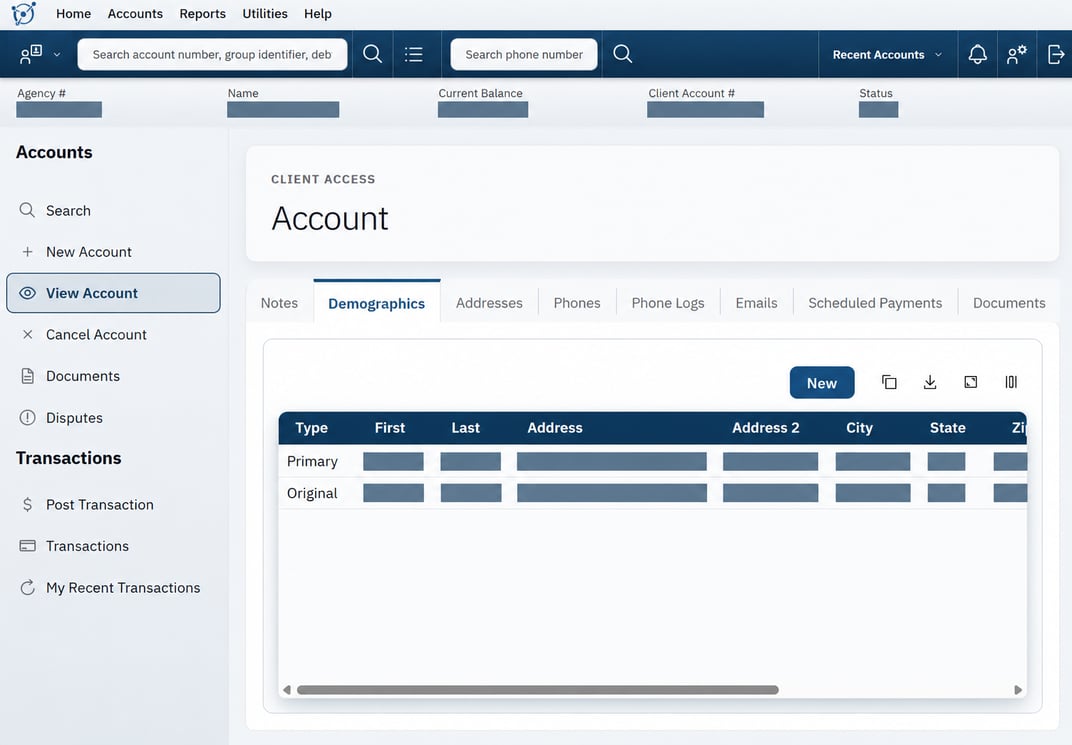
Image Displays the New ACE Client Access Interface and Demographics Tab.
Client Access PLUS
Client Access PLUS is a package add-on that includes Client Messages and Task Management, helping agencies and clients communicate and manage account-related work.
Current customers interested in Client Access PLUS can schedule a meeting with our Customer Solutions Team to learn more.
Read more about Client Access PLUS features and setup.

Image Displays the Client Access PLUS Messages Inbox and Message Filters.
New Features and Updates
Workflow and Automation
Logic Block Enhancement
Logic Block Version 2 improves consistency between testing and automated workflows, including Action Paths. Previously, a Logic Block could produce different results when testing accounts compared to processing those same accounts through a workflow. Version 2 addresses these differences so that testing and automated workflows produce matching results.
Version 2 Availability
InterProse Support will coordinate the transition to Version 2, including compatibility testing and migration of existing Logic Blocks.
Customers Using Version 1: Existing and new Logic Blocks will continue using Version 1 until Version 2 is enabled.
Customers Using Version 2: New Logic Blocks will automatically use Version 2. Existing Logic Blocks will continue using Version 1 unless individually migrated.
If needed, InterProse Support can restore Version 1 evaluation without changing saved Logic Block configurations. Previously executed actions will not be reversed.
To transition to Version 2, contact InterProse Support.
Number of Days Date Ranges
ACE date-range selectors now offer Number of Days for custom ranges relative to today. Positive values select past dates through today, negative values select today through future dates, and zero selects today only. Saved relative rules and report parameters adjust as the current date changes.
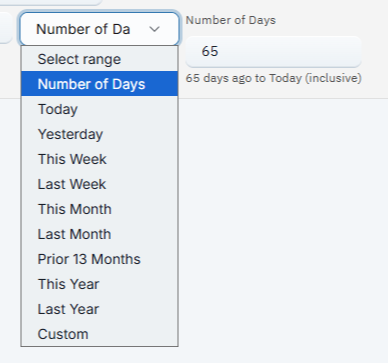
Image Displays a Number of Days Date Range Set to 65 Days Ago Through Today.
Rainmaker Insights
Commission Forecast Reporting
Rainmaker Insights now uses configured ACE commission rates to generate more accurate commission forecasts. Forecasts account for client commission rates, account-level overrides, and applicable commission rules, with separate calculations for principal, fees, and interest.
Report Deletion Protection
ACE now prevents the deletion of SQL report templates and Rainmaker Insights visuals that are used by job tasks. If a report is in use, a message identifies the associated jobs and tasks so users can update or remove those references before deleting it.
Example message
Cannot delete this report template because it is used by the following job tasks:
Job: "DEV-14321 client report runner" (ID 2265)
Task: "Report Runner: Run as User" (ID 9631)
Remove or change these report selections before deleting the report.
Statute-of-Limitations Debt-Type Reporting
Rainmaker Insights reports can now display statute-of-limitations (SOL) debt-type names alongside their IDs, making debt types easier to identify. This includes inactive debt types associated with historical accounts.
Existing reports are unaffected. Users can add debt-type names to their reports as needed.
Transaction Spreader Reporting
Rainmaker Insights reports can now include transaction spreader names, identifiers, and the order or percentages used to allocate payments across principal, fees, interest, and other balance categories.
When access restrictions prevent a report from running, RI explains the restriction and directs users to their administrator or Support, instead of repeatedly attempting to repair the SQL.
Example access-restriction message

Image Displays a Rainmaker Insights Access Restriction Message.
Message text: The requested reporting data is unavailable with your current access. Changing the SQL cannot grant access. Contact your administrator or support.
Visual Metadata
The Rainmaker Insights visual builder now displays the creator, last updater, corresponding timestamps, and Report Visual ID in a metadata panel.
Email and Text
ELS Email Feedback and Unsubscribe Support
Eligible ELS emails now support one-click unsubscribe in compatible mailboxes and include feedback tracking to help email providers identify sending campaigns. Consumers can also confirm an unsubscribe request on a separate page without signing in to ACE.
These updates apply automatically when ELS is enabled. Existing email-template unsubscribe links continue to work, with no template changes required.
Example: Email unsubscribe confirmation

Image Displays the Email Unsubscribe Confirmation Page.
Text Message Profile Date Columns
Text Message Profile lists now allow users to select and display Create Date and Last Update columns. The new columns use the existing list chooser and do not alter users’ default column layouts.
Pending Email Management
Under Utilities → Pending Emails, authorized users can search queued, unsent emails by recipient, subject, template identifier, or account ID and cancel individual or selected messages before delivery begins. Cancelled emails remain available in email history.
Emails blocked by firewall restrictions now count toward the retry limit, preventing repeated attempts to send messages that cannot be delivered.
Imports and ETL
ETL Account Import Performance
ETL imports using Account Assignments as the Load Method now check for duplicate accounts more efficiently when Unique Account uses a searchable text field from a custom form, such as an invoice number. This reduces import delays while preserving existing duplicate-matching rules.
No changes to import settings are required.
Multiline Quoted CSV Imports
ETL imports now support CSV files containing text that spans multiple lines, such as email logs with HTML message content. When Quote Character is configured in the import profile, ETL recognizes line breaks within quoted fields as part of the same record rather than treating them as separate records.
For example, an email log containing a five-paragraph message can be imported as a single record, preserving the complete message and keeping the remaining fields aligned.
Example: Imported multiline email log
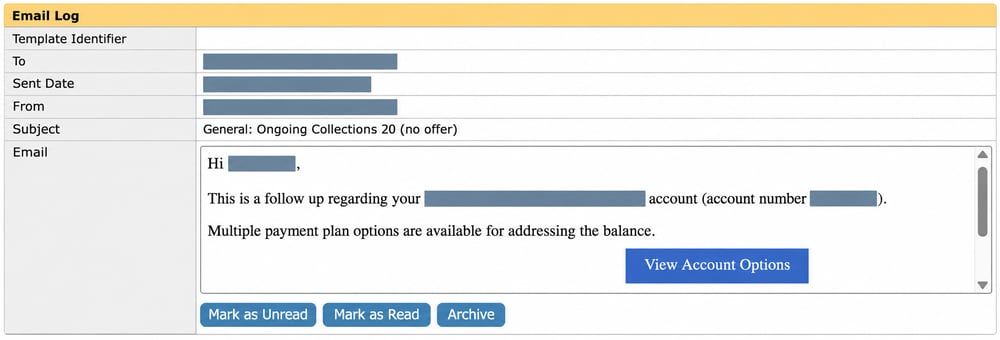
Image Displays a Multiline HTML Message Preserved in One Email Log Record.
Custom Columns and the ETL Pro Logic editor now use the corresponding standard ETL permissions.
Please Note
Quoted records are limited to 1 MiB. Users with only ETL Pro permissions need the corresponding standard ETL permissions to continue using these controls.
Virtual Agent
Creditor Name on Virtual Agent Receipts
Virtual Agent payment receipts now include a Creditor field beneath Amount, showing the company name from the account’s client profile. This helps consumers identify who their payment is for. The creditor name also appears in downloaded receipt PDFs.
Example: Creditor field on a Virtual Agent receipt
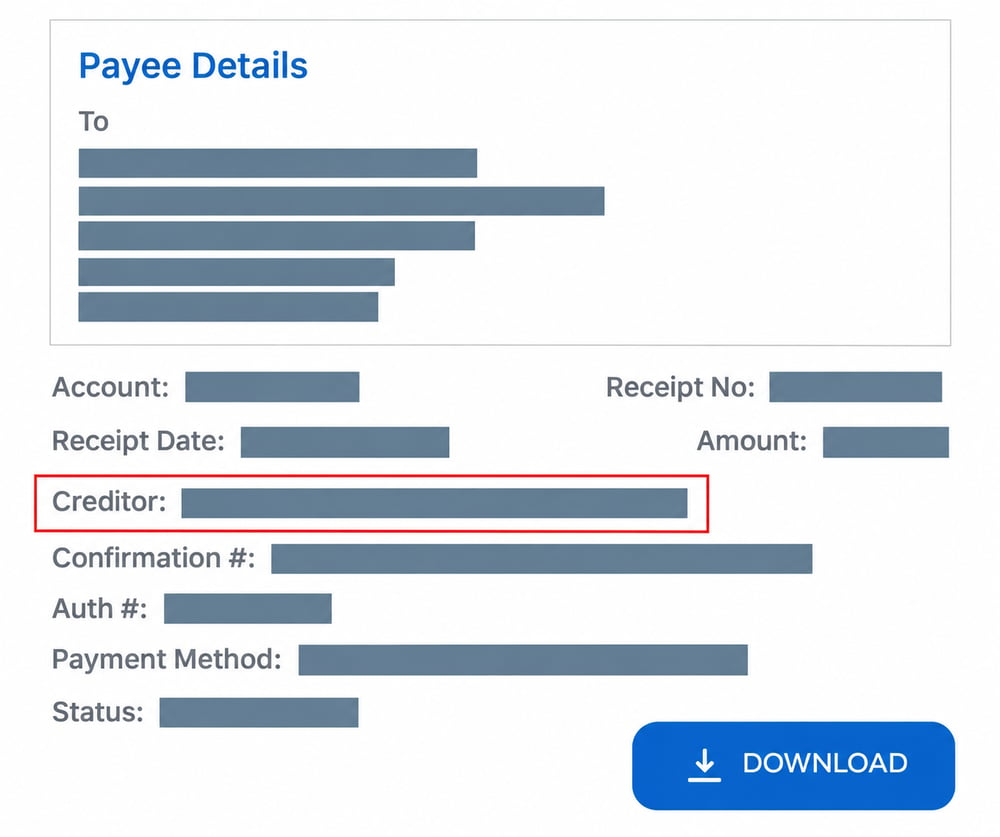
Image Displays the Creditor Field on a Virtual Agent Payment Receipt.
Administration and API
API Resilience
Improvements to API request handling increase reliability during periods of high activity.
New API Endpoints
Job Task Execution History: Three new read-only endpoints provide task timing, outcomes, and counts of logging calls and progress updates:
GET /api/job/{jobID}/log/{logID_or_latest}/taskLog: Lists finished task executions within a specific job run or the latest run.GET /api/job/{jobID}/task/{taskID}/log: Lists execution history for a configured task across job runs.GET /api/job/{jobID}/task/{taskID}/log/{taskLogID_or_latest}: Retrieves a specific task execution or its latest execution.
All three endpoints require the administrator API role and matching customer ownership. Task execution history is also available in customer reporting data.
Please Note
Records become available after each task finishes. Earlier runs are not backfilled. Progress-update counts can include related records and do not represent an exact account count.
To view endpoint details, go to Help → API Documentation in ACE.
Fixes
Accounts and Client Access
Client Access Search Navigation
Client Access users could reach incorrect Account Search or transaction screens, and Search Results could fail to reopen the last completed search. This is now fixed, including searches that opened a single matching account directly.
Client Inventory Multiple-Client Results
The Client Inventory report could omit additional selected clients for Client Access users. This is now fixed. Results and downloads include all selected clients the user is authorized to access.
Primary Client Relationships
Circular Primary Client relationships could prevent client details from loading. This is now fixed, and ACE rejects relationships that create or lead to a loop.
Recent Account Summary
The Rainmaker Insights account summary could show an earlier account after navigating to a different account. This is now fixed, and the summary follows the latest account visited.
Virtual Agent
Virtual Agent Payment Schedule Amounts
Virtual Agent payment schedules could display $NaN instead of an installment amount during payment-plan setup. This is now fixed, and scheduled installments display the payment amount, including any applicable service fee.
Virtual Agent Business Guest Sign-In
Minor company-name variations could prevent business users from signing in to Virtual Agent 2.0 as guests. This is now fixed, allowing a close company-name match and correct ZIP code to identify the business even when the entered contact name differs. Existing identification safeguards remain in place.
Workflow and Automation
Account Form Trigger Updates
Inserting an account form could cause a duplicate-form error when its trigger updated the same form. This is now fixed, allowing the configured field updates and subsequent Action Path steps to complete.
Form Visibility Errors
Errors evaluating a form’s account visibility logic were not displayed to users. This is now fixed, and the error message identifies the affected form and logic block.
Form-Field Date Trigger Processing
Form-field date triggers saved without a form or date field could cause date-trigger processing to fail. This is now fixed, and both selections are required when configuring these triggers.
Please Note
Existing form-field date triggers with missing or deleted form or field references are deactivated during the update. Review affected triggers under Setup → Workflow → Triggers, select a valid form and date field, and save your changes before reactivating them as needed.
Rainmaker Insights
Custom Date Ranges in Report Runner Job Tasks
Report Runner job tasks could ignore saved custom dates for Rainmaker Insights reports and use the current month instead. This is now fixed, and reports use the selected date range.
Dashboard Sign-Out Destination
Signing out from a Rainmaker Insights dashboard could carry the previous user's dashboard destination into the next login. This is now fixed. Explicit sign-out returns the next successful login to the ACE homepage.
Empty Report Generation
Report Runner could generate empty Rainmaker Insights reports and emails when Generate Empty Reports was disabled. This is now fixed for HTML and PDF output.
Repeated Columns in Report Exports
Rainmaker Insights exports could omit repeated columns shown in the preview. This is now fixed. CSV, Excel, and scheduled-job exports preserve repeated columns and their saved order.
Report Parameter Refresh
Rainmaker Insights reports refreshed while users entered parameter values, interrupting typing. This is now fixed.
Signing Back In After Sign-Out
Signing out from Rainmaker Insights could lead to a login page that prevented users from signing back in. This is now fixed.
Visual Folder Navigation
Moving quickly between Rainmaker Insights Visuals folders could make the page sluggish or unresponsive. This is now fixed, and the visual list follows the most recently selected folder.
Visuals in Configuration Imports
Portal configuration imports could omit Rainmaker Insights visuals. This is now fixed, and missing customer-specific visuals are included while existing visuals retain their identity and references.
Email and Text
Text and Email Message Content
Text messages and emails could display repeated tracking information throughout the message when a Virtual Agent login link was unavailable. This is now fixed, preserving the original message content.
Payments, Commissions, and Forwarding
Client Credits on Gross Invoices
Gross invoices could display carried-forward client credits under Please Remit even when those credits were included in the remittance payment. This is now fixed. When Include Past Due Amount on Remit is enabled, eligible credits appear in the client check amount.
PayNSeconds Credits with Service Fees
Crediting a PayNSeconds transaction that included a service fee could fail with a refund-amount error. This is now fixed.
Post Transaction Spreader Selection
The Post Transaction Spreader dropdown could omit eligible spreaders beyond the first 25 entries. This is now fixed, allowing users to search for and select all spreaders available to them.
Service Fees on API Payments
Card and ACH payments submitted through the account payment API could omit configured service fees when the account ID appeared only in the request URL. This is now fixed.
Letters and Exports
Template Vendor Letter Exports
Template Vendor letter exports could leave incomplete output after a processing error. Exports now continue past individual letter failures and include only successfully exported letters. Failed letters remain pending.
Imports and ETL
Transaction Import History Counts
Transaction ETL history could overstate Record Count by including processing-batch iterations. This is now fixed. Record Count reflects processed records, with skipped records shown separately in Skip Count.
Universal Phone Deactivation
Phone Numbers ETL imports could leave existing matching numbers active when Deactivate Phones Universally was enabled. This is now fixed, so qualifying imports deactivate matching numbers across accounts within the same customer.
Administration and API
File Manager Document API Updates
The document PATCH API could reject File Manager documents that were not associated with an account. This is now fixed for authorized users.
Legacy Dashboard Menu Removal
The legacy Setup → Dashboards menu option has been removed from the Rainmaker Insights interface, simplifying the Setup menu.